
.png?width=1200&height=627&name=DWOA_Featured%20Image_The%20Practical%20Business%20Case%20for%20Digital%20Workplace%20Operations%20Automation_Blog%20(1).png)
Most enterprise IT teams already have the core systems needed to manage the digital workplace. Endpoint management, ITSM, identity, security, asset management, DEX tooling, application catalogs, packaging tools, and reporting platforms are usually in place.
The challenge is that the work does not stay inside one system. A device refresh, application update, Windows change, or vulnerability response often depends on data and action from several places. The request may start in ITSM. The deployment may happen through Intune or Configuration Manager. User and device context may come from identity, asset, endpoint, and DEX tools. An application may need to be packaged, tested, approved, and assigned before deployment, remediation, or migration work can continue.
What is Digital Workplace Operations Automation?
That is where Digital Workplace Operations Automation (DWOA) becomes a practical business case rather than just another category name. DWOA is not about replacing the tools enterprises already use. It is about coordinating work across them and connecting demand, preparation, execution, validation, evidence, and exception handling into a repeatable process.
How Juriba supports Digital Workplace Operations Automation
For Juriba, this is a natural fit.
Juriba DPC is an ideal starting point for organizations taking practical steps toward DWOA. It helps bring together data from existing systems, establish operational context, support lifecycle workflows, and provide visibility into progress, exceptions, and outcomes. In many cases, the first value comes from using Juriba DPC to coordinate the tools and processes already in place.
From there, additional Juriba solutions can help address common gaps that often prevent digital workplace workflows from operating consistently at scale.
Application packaging and deployment readiness
One of those gaps is the work required to prepare applications for deployment. Many digital workplace workflows depend on applications being packaged, tested, deployable, and supported with evidence. Juriba App Readiness helps address this through packaging automation, PSADT wrapping, smoke testing, deployment preparation, and publishing to platforms such as Intune and Configuration Manager.
Application ownership and business context
Another common gap is application ownership. Automation becomes harder when nobody is confident about who owns an application, who can approve a change, or who can validate whether a version is still required. Juriba App Owner helps bring ownership and business context into application workflows so operational processes are not dependent only on IT interpretation.
Application intelligence and AI-assisted guidance
Juriba also delivers application intelligence and AI-assisted guidance within its solutions. Application matching, metadata, command lines, download sources, detection rules, and automation guidance help increase the number of applications that can move through a repeatable process instead of becoming one-off manual work.
Why orchestration alone is not enough
This is the point that can get missed if DWOA is described only as orchestration. Coordinating a workflow does not help enough if the package is not prepared, the application owner is unknown, the deployment logic is incomplete, or the outcome cannot be validated. The business case improves when DWOA connects orchestration to execution.
What a practical DWOA workflow looks like
A practical application workflow might start with a vulnerability, a lifecycle event, a migration need, or a request for a new version. From there, the process needs to identify the application, understand ownership and usage, choose the right packaging path, prepare the package, test the result, capture evidence, and publish to the management platform. Exceptions need to be visible and routed instead of disappearing into email, spreadsheets, or tribal knowledge.
Managing exceptions at scale
A good DWOA process should not assume every exception disappears. It should make exceptions visible, route them to the right owner, and reduce the same issues from recurring. Over time, the goal is to move more work through the standard path and reserve manual intervention for the cases that genuinely need it.
Managing exceptions at scale
The value of DWOA should be measured in operational terms:
-
How much work can move through a repeatable process?
-
How often does it succeed the first time?
-
How many exceptions are created, and why?
-
How much manual effort is removed?
-
How much faster can work move from request to deployment?
-
Is there evidence that the work was completed correctly?
Building trust through testing and evidence
This is especially relevant for packaging and testing. A package created without validation still leaves risk in the process. Smoke testing, deployment evidence, quality review, and UAT support help make automation more trustworthy. They also give IT teams a better basis for deciding when work can continue automatically and when it needs human review.
Where organizations can start
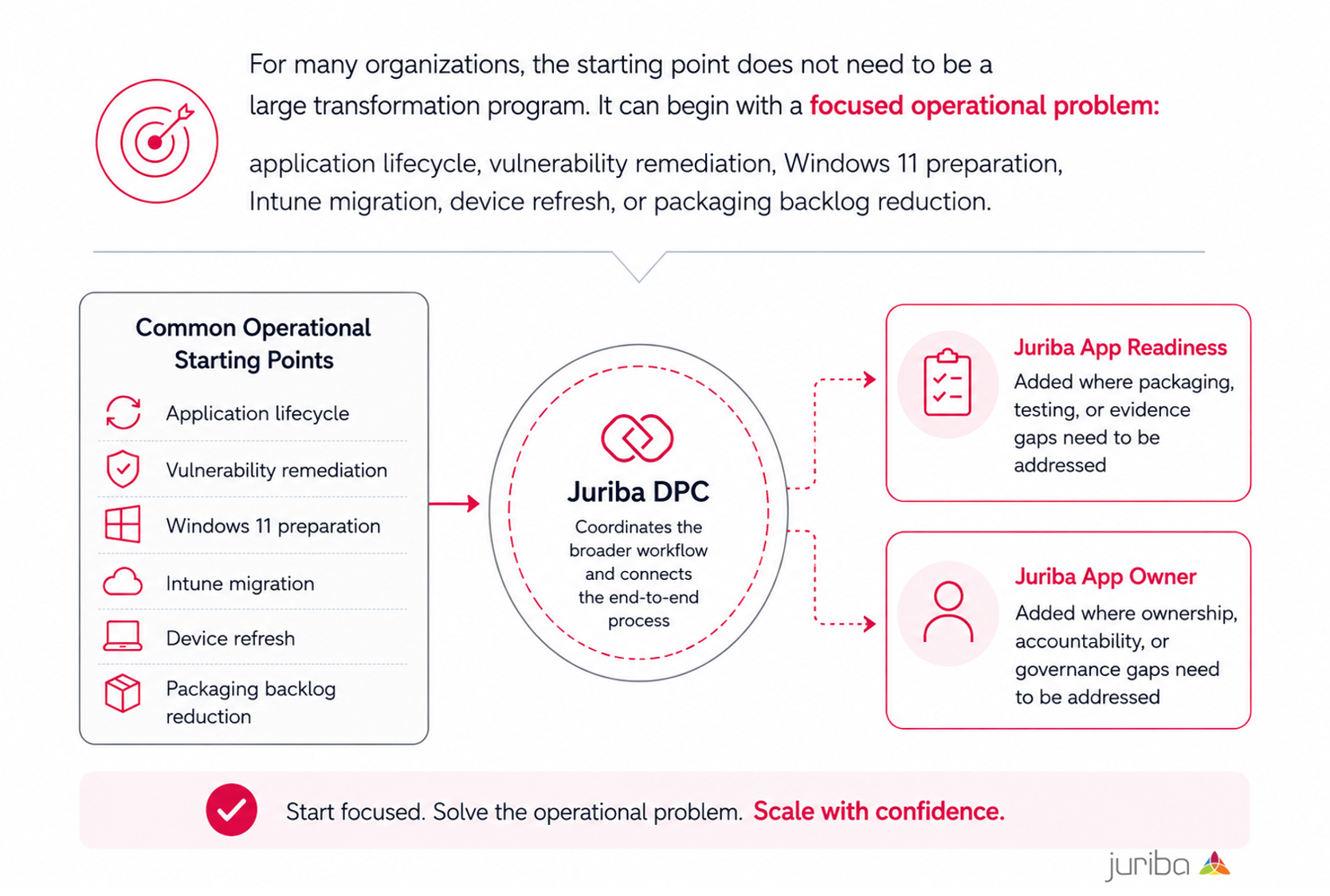
For many organizations, the starting point does not need to be a large transformation program. It can begin with a focused operational problem: application lifecycle, vulnerability remediation, Windows 11 preparation, Intune migration, device refresh, or packaging backlog reduction. Juriba DPC can help coordinate the broader workflow, while Juriba App Readiness and Juriba App Owner can be added where packaging, testing, evidence, or ownership gaps need to be addressed.
A better way to run Digital Workplace operations
The goal is not automation for its own sake. It is to reduce manual coordination, improve consistency, make exceptions visible, and give IT teams confidence that operational work is being completed in a controlled and measurable way.
That is where DWOA becomes more than a category. It becomes a better way to run digital workplace operations.
.png?width=1200&height=627&name=DPC_Featured%20Image_Manage%20Lists%20Juriba%20DPC%205.18%20(1).png)